
Banner Image

Cannot update ZH3's firmware

aqqqee11

New member
스크린샷 2025-11-20 183221.png


https://support.fosiaudio.com/products/zh3


I followed the guide and installed the new firmware from the link above, but for some reason the firmware won’t update. The DFU tool clearly shows “success”, but when I reopen the DFU tool to check, the version is still the previous 1.14. I’ve tried using a USB 2.0 port and different cables, but it didn’t help at all. Reinstalling drivers or running the program as an administrator also made no difference.

Is there anyone who has experienced the same issue or knows how to fix it? As far as I know, most DACs have a firmware update mode, so I’m not sure whether this issue is related to the device settings or the firmware itself.
 
Last edited:
Hi, do you follow this step from DOCX?
9. Configure Driver After Firmware Upgrade (See Attached Instructions)

For me it works: v1.15
Their description is complete bullshit. There are a lot of unnecessary steps. I’ve already done it maybe 10 or 20 times. The only thing you need to do is edit FosiAudioUsbAudioCpl.xml with Notepad or Notepad++:

<PageOptions>
<!-- Supported values for this page: Hidden (default), Visible -->
<Visibility>Visible</Visibility>
</PageOptions>

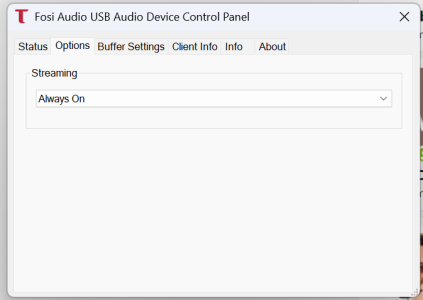
Moreover, i've turned on more tabs but its just info tabs

1770325986845.png

All the other options remain the same. Editing the XML does not affect the success of the firmware update.

Moreover, these aren’t even their own drivers — they’re drivers from the German company Thesycon.
Thesycon-USB-Audio-Class-2.0-Driver-for-Windows_5.68.0.


They make these drivers for companies like Fosi Audio and about two dozen others. Internally, they differ only by the &lt;DriverInterfaceGUID&gt;{nnnnnnn-2025-4414-mmmm-namingFosiAudio}&lt;/DriverInterfaceGUID&gt; and AsioDriverGUID + couple of other settings.


I can simply take drivers from another vendor — for example, from JDS Labs — download them, modify the XML to match Fosi’s ID, and everything will work exactly the same. The only difference will be the logo. That’s it.
 
Last edited:
I spent two nights trying to open update_zh3_1.1.5_5ms_same_spdif.bin with a raw hex editor, but still haven’t had any success. If I manage to fix it, maybe I’ll sell proper drivers to FOSI Audio 😆😆😆
 
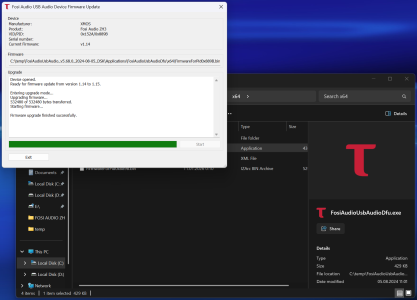
I've even able to add strings to the updater dfu for showing such info as updating 1.14 to 1.15. But firmware always remains 1.14.
It always stays at 1.14, no matter what I do or how hard I try. The problem is specifically in the .bin firmware file and/or some kind of hardware issue during the assembly of the amplifier board or the chip.
1770329643465.png
 
Back
Top